
|
||||||||||
| PREV NEXT | FRAMES NO FRAMES | |||||||||
System.in.
See:
Description
| Packages | |
|---|---|
| com.fedmest.cw.keyboard | This package defines the core of the Keyboard Library framework for accessing keyboard input. |
| com.fedmest.cw.keyboard.internal | This package contains the default implementation of KeyboardUtils. |
| com.fedmest.cw.keyboard.validators | This package provides basic implementations of KeyboardInputValidator. |
The Java Keyboard Library is a complete framework for simplifying keyboard input and allowing efficient
data validation and conversion from strings typed through System.in. As it stands the library
offers a complete API that should be enough for most use cases, but it has been created with extensibility
in mind and new validator classes can be developed to meet any need related to keyboard input.
The project was devised for console development, allowing programmers to rid their code of most boilerplate
instructions around the System.in keyboard stream. But it may be found useful in Java
teaching, too: as a Java instructor, I initially developed the project for use in my basic Java courses.
It provided a black-box for keyboard input, allowing the learners to create interactive console
applications without introducing streams, exceptions and other more advanced topics from the very start.
Learners could also be make use of the library as a simple example of framework development and of
the use of JavaDoc comments, or as a base for generic exercises (such as creating new validators).
Though a thorough validation and conversion framework has been designed to make it easy to add different ways of reading keyboard input, programmers will already find methods that enable them to read all primitive data types and simple strings out of the box, as well as a choice validator class for basic character-based console menus. Getting input from the keyboard regardless of what was typed is also possible.
Reading a string from the keyboard, without any validation or conversion
String text = KeyboardUtils.getDefaultKeyboardUtils().readFromKeyboard("Type something");
System.out.println("You typed : " + text);
Reading a simple type from the keyboard. The call to the reading method will not return until the user enters a valid value for the specified type.
int i = KeyboardUtils.getDefaultKeyboardUtils().readIntFromKeyboard("Enter an integer");

System.out.println("You entered : " + i);
Reading a simple type from the keyboard. This time we'll make the input cancelable, so the user can terminate by type a cancel sequence (by default, typing nothing and pressing <enter> corresponds to a request to cancel.
KeyboardUtils utils = KeyboardUtils.getDefaultKeyboardUtils();
utils.setCancelable(true);
int h = utils.readHexFromKeyboard("Enter a hex number (or nothing to cancel)");
if ( utils.wasCanceled() ) {
    System.out.println("You canceled input");
} else {
    System.out.println("You entered : " + h);
}
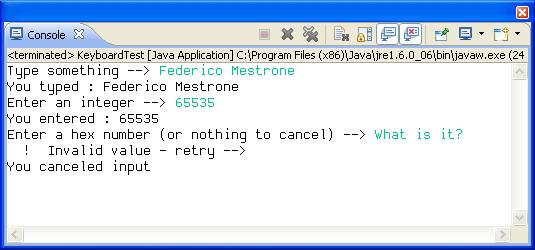
The following images show you the result of running the three snippets above in sequence. In the second snapshot, the user canceled input instead of entering a correct hexadecimal number.
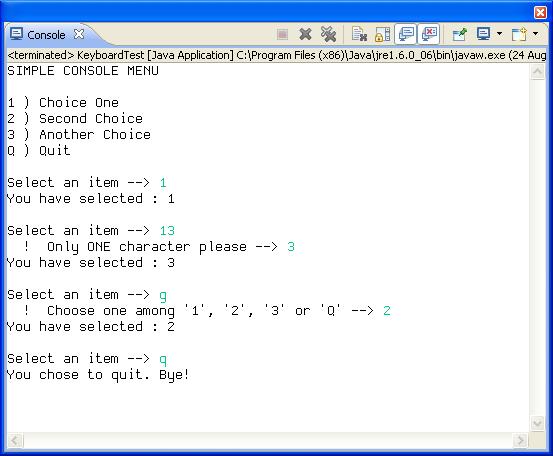
A slightly more complex example shows the use of the choice validator, a predefined validator class for handling console menus based on a character choice. Following the code snippet is a picture that shows a sample interaction with the menu.
System.out.println("SIMPLE CONSOLE MENU");
System.out.println();
System.out.println("1 ) Choice One");
System.out.println("2 ) Second Choice");
System.out.println("3 ) Another Choice");
System.out.println("Q ) Quit");
CharChoiceValidator menuValidator = new CharChoiceValidator("123q");
menuValidator.setCaseSensitive(false);
menuValidator.setErrorMessages("Only ONE character please", "Choose one among '1', '2', '3' or 'Q'");

char choice;
do {
    System.out.println();
    choice = KeyboardUtils.getDefaultKeyboardUtils().readFromKeyboard("Select an item", menuValidator);
    switch ( choice ) {
    case '1':
    case '2':
    case '3':
        System.out.println("You have selected : " + choice);
        break;
    case 'Q':
    case 'q':
        System.out.println("You chose to quit. Bye!");
        break;
    }
} while ( choice != 'q' && choice != 'Q' );
|
||||||||||
| PREV NEXT | FRAMES NO FRAMES | |||||||||